Tag Archives: gamers

E3 2019 Schedule & Where To Watch

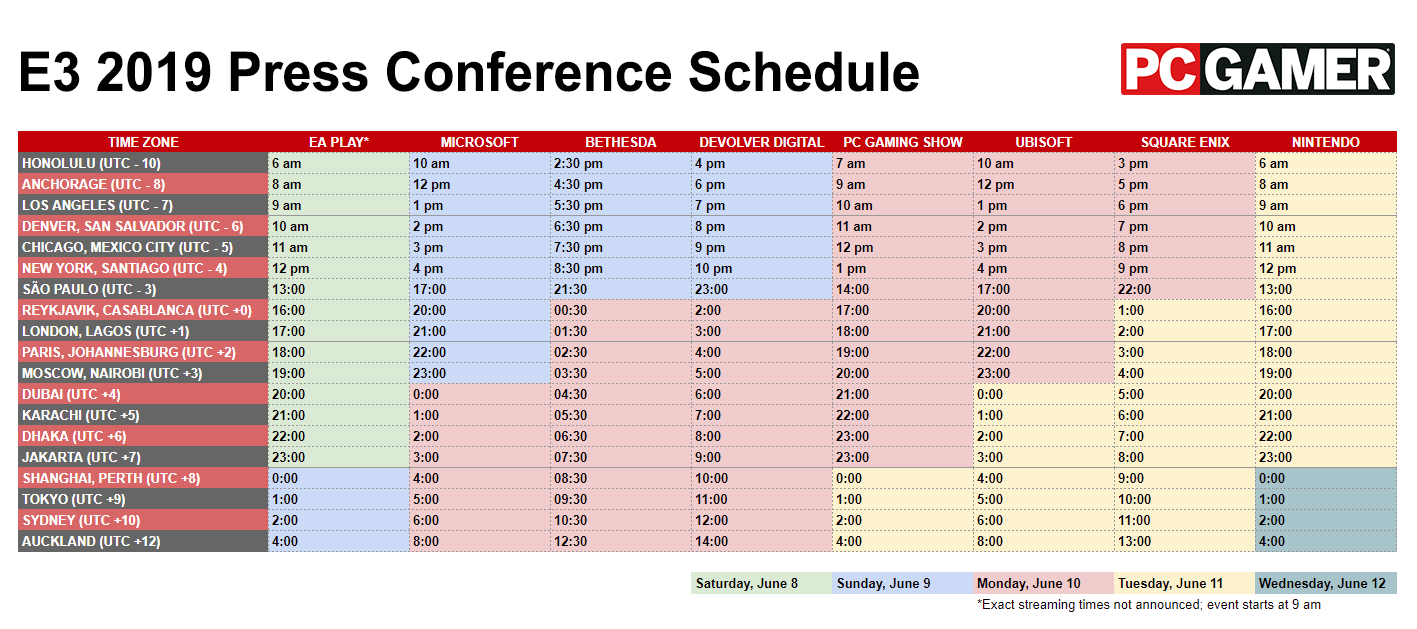
I share the schedule for E3 2019 for all the Press Conferences: Microsoft, Bethesda, Nintendo, Ubisoft, Square Enix, EA, PC Gaming Show. I also share where you can watch all of these. All the appropriate are right below for your ease of access.
By the way, I completely skipped over Devolver Digital (for some reason), which is set to have its Press Conference for 7:00PM PST / 10:00PM EST on Sunday, June 9th, right after Bethesda’s press conference.

For mostly Dragon Age content, subscribe on YouTube.

PC Gamer Schedule by Time Zone:  http://cdn.mos.cms.futurecdn.net/DoEAR8FAKaXptWxpU6Dk68.png

Kidlee’s Twitch: https://www.twitch.tv/kidlee
IGN YT: http://youtube.com/ign
EA YT: http://youtube.com/ea
Microsoft Mixer: http://mixer.com/xbox
Bethesda YT: http://www.youtube.com/user/BethesdaSoftworks
Ubisoft YT: http://www.youtube.com/channel/UCBMvc6jvuTxH6TNo9ThpYjg
PC GS Twitch: http://www.twitch.tv/pcgamer
Square Enix Website: https://square-enix-games.com/en_US/news/e3-2019
Devolver Digital Twitch: http://www.twitch.tv/devolverdigital
Nintendo E3 Website: http://e3.nintendo.com/

📗Buy my book: https://binkyproductions.com/stardustdestinies

✅Where else to find me:


Twitter: @BinkyProd
http://Steemit.com/@BinkyProd

💚How to Support me:
Steem Monsters: https://steemmonsters.com?ref=binkyprod
Support me on Patreon: http://www.patreon.com/BinkyProd
PayPal Tip Jar: http://www.binkyproductions.com/howtocontribute
Amazon WishList: https://www.amazon.ca/hz/wishlist/ls/14HC5WNPV3KV4?ref_=wl_share
https://youtu.be/fX14QZ7xfyE


Shadie’s Gameplay!

Good evening, my fellow gamers. I want to announce the launch of my sub-channel titled “Shadie’s Gameplay.” I am in the process of reuploading some gameplay footage to that channel right now. I’ve added channel art and my profile pic, although the official profile pic is taking time to appear as it should everywhere, so you may just see a green icon with the letter S on it for “Shadie”. Though, I must admit, I’m glad YouTube chose green for me as a default haha.

YouTube Banner Gameplay.jpg

Shadie’s Gameplay is going to feature long form gameplay, cutscenes, Let’s plays, fights, etc. I will continue to post short clips on DarthShadie, and those clips will be featured in playlists on Shadie’s Gameplay. However, the main focus on DarthShadie always has been and will remain theories, predictions, parodies, drinks, and the likes. And mainly for Dragon Age, occasionally for Mass Effect and SWOTR and rarely for other games, such as Fable.

On Shadie’s Gameplay I’ll be transferring my Dragon Age The Last Court narrative gameplay (which I am doing right now, in a few hours, those videos will have disappeared from DarthShadie). I will also transfer all my Mass Effect Andromeda Let’sPlays and GamePlays to that new channel as well.

Eventually, when I am ready to upload footage from some of my DAI play throughs, on Shadie’s Gameplay is where they’ll go.

Oh, and the first link, right after my website link on that channel is…Steem Monsters. I made sure to put SM and Steemit at the forefront. Hopefully we can bring on a few more peeps to this side of the blockchain too hehehe

So stop by and subscribe. It looks rather bare with but a few subscribers. Let’s give the channel some love so I can give it its unique link. Thanks!

https://www.youtube.com/channel/UCalH2unBHpCgVDi_8bX-0Yw/


New Channel Trailer for DarthShadie!

Welcome to my Channel

Welcome to DarthShadie! I’m Shadie (Binky), and on this channel you will find a lot that has to do with video games, most notably Bioware games. Dragon Age, Mass Effect, Star Wars The Old Republic, some Fable at times, theories and predictions, gameplay reviews, parodies, and music interpretations. There is also some Star Wars content, cosplay and DIYs, and such.

Subscribe to DarthShadie today!

https://youtu.be/43Doaz3DGqM


How To Edit in Lightworks for Gameplay & YouTube (Lightworks Tutorial)

Here is a Tutorial on How to Edit in Lightworks, a free editing software for PC, for your gameplay videos and for YouTube videos, or basically to go from gameplay to YouTube, if said gameplay requires certain adjustments. I show you the basics of how it works with demonstration so that this can be a comprehensive guide for you, so that you can use Lightworks with ease. I also make a few comparisons with Final Cut Pro, which I use for my more elaborate video edits and talk about some of the differences that I like more and less about Lightworks versus FCP.

I am not affiliated with or sponsored by Lightworks, but it is free and I use it and I wanted to share how it can help you too.

For more gaming and random tutorial content, subscribe on YouTube.

https://youtu.be/NSgjNnROJHs